AI That Understands Your Portfolio — Connected to Your IBKR Account
Your Portfolio.
Your AI. Connected.
Connect AI platforms that support Model Context Protocol (MCP), including
ChatGPT, Claude, Grok, and Perplexity to your IBKR account.
Execute supported trades based on criteria you set, within a dedicated AI Partition.
Already an IBKR client? Connect Your AI
Why IBKR AI Integration Is Different
Combine supported AI with global market access, authorized account data and full client control.
 Your Preferred AI, Connected to IBKR
Connect supported AI through IBKR's MCP infrastructure. Authenticate directly with Interactive Brokers.
 Insights Grounded in Your Account
Analyze authorized positions, balances, activity, exposures and portfolio structure.
 Stocks, Options and ETFs Worldwide
Research and monitor opportunities across 75,000+ stocks, options and ETFs worldwide.
 Global Market Access
Research opportunities across 175+ global markets.
IBKR Autonomous Trading New
IBKR Autonomous Trading extends AI Integration with AI-assisted execution based on criteria you set, without requiring confirmation for each order.
You Stay in Control
- Dedicated AI Partition
- Funding limited to allocated cash
- Fixed product and trading restrictions
- Trade execution notifications
- Revoke access through Client Portal


Qualify for Autonomous Trading
Autonomous trading allows supported AI platforms to place trades in a separate, funded AI Partition without requiring your approval for each order. To qualify, you must meet the following requirements:
Have an eligible account
Autonomous trading is available to individual, non-margin IBKR accounts. Joint, retirement, advisor-managed, organizational and Lite accounts are not eligible.
Complete trading requirements
Execute at least 10 trades of $100 or more each over a two-week period using Review & Approve mode, where you approve and submit each AI order.
Coming soon: Clients can complete an eligibility test in lieu of the trading requirement.
Once activated, your AI can execute permitted trades within your funded partition. You retain responsibility for all trading activity and can revoke access at any time.
Move From Generic Answers
to Portfolio-Aware Intelligence
Your AI can work with authorized account information and monitoring tools to help you research opportunities, analyze your portfolio and monitor the market.
From Research to Execution
IBKR AI Integration supports research, analysis, monitoring and trade preparation.
Add IBKR Autonomous Trading to move from trade preparation to AI-assisted execution.
-
Research“What sectors overlap with robotics and automation?”
-
Research“What ETFs provide exposure to clean energy, semiconductors or space exploration?”
-
Research“Compare AAPL and AMZN across revenue growth, margins, valuation and analyst expectations.”
-
Research“Identify companies associated with AI infrastructure spending and improving earnings estimates.”
-
Analyze“Summarize my largest positions, sector exposures and currency concentrations.”
-
Analyze“Which position has my largest unrealized gain and which has my largest unrealized loss?”
-
Analyze“Look up implied volatility and 52-week high and low for each of my holdings. Which are most volatile now?”
-
Analyze“What currencies am I holding cash in?”
-
Monitor“Review my watchlist and identify securities with the largest price moves today.”
-
Monitor“Do I have any open orders? Show the current status of each.”
-
Monitor“What orders did I place today, and which trades filled?”
-
Monitor“Warn me if my margin cushion falls below 20%.”
-
Prepare“Create sell instructions to reduce my position in AAPL by 5%.”
-
Prepare“Create sell instructions to trim any equity position above 15% of my net liquidation value down to 10%.”
-
Prepare“Use no more than 10% of my buying power to create equal-sized buy instructions for the approved symbols I provide.”
-
Prepare“Show the proposed account, side, quantity, order type, limit price, estimated value and available cash before creating the instruction.”
-
Autonomous Trading“Every Monday, sell 5% OTM weekly calls against my uncovered 100-share lots.”
-
Autonomous Trading“Close any short option once it's captured 50% of max profit.”
-
Autonomous Trading“Manage my AI leaders watchlist with the top 10 AI-theme stocks, refreshed weekly.”
-
Autonomous Trading“Close any stock position that falls 15% below my cost basis.”
Options involve risk. For more information see ibkr.com/occ
Available on Mobile, Web, and Desktop
AI Integration is available across IBKR trading platforms.
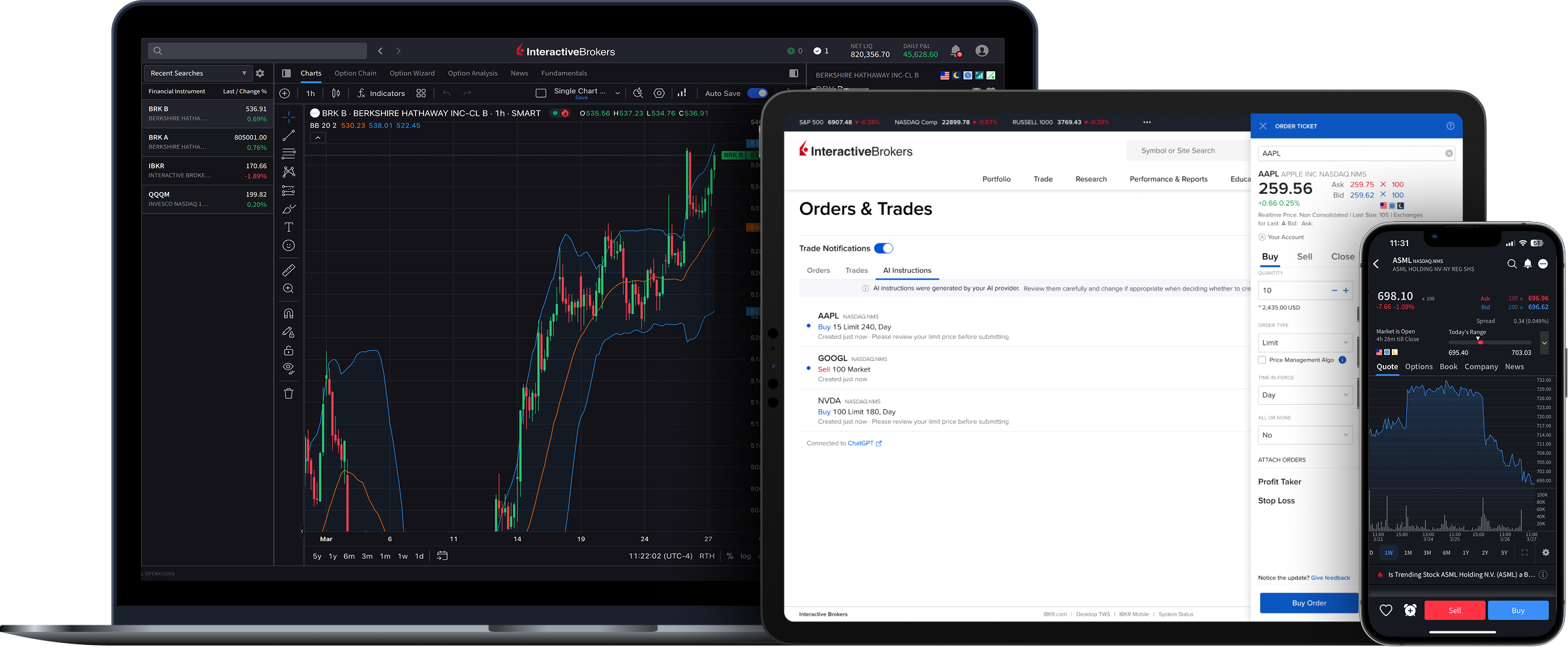
Supported integrations include:
ChatGPT Claude Grok Perplexity
Plus any AI tool that supports Model Context Protocol (MCP)
Gemini is coming soon.
Connect AI to IBKR
Research, analyze, monitor and act with AI connected to IBKR.
USER GUIDES
Get Started with AI Integration
For information on how to connect your AI to your IBKR account, select your trading platform.
Frequently Asked Questions
Using a different AI app? Any AI application that supports MCP, including Claude Code, ChatGPT Codex, Cursor, and more, can connect. In your AI application, look for Add MCP Server or Custom Connector, then enter: https://api.ibkr.com/v1/api/mcp-public
Disclosures
AI Integration is not available in IN or JP.
Please keep in mind that there are material risks to autonomous AI trading, described in Autonomous Trading Risk Disclosure, especially agents placing orders you did not intend or that are erroneous or out of line with your trading wishes. Although these risks can never be eliminated, IB's integration is designed to limit the types of products your AI provider can trade, slow the speed of the orders it submits and give you the ability to control how much of your account you let the AI trade. If you link an AI provider, including browser-based and similar agents, you are providing those AI agents with full control of your account, without any controls or limits.
Eligible clients may authorize a third-party AI platform to connect to their IBKR account. IBKR is not affiliated with, does not control or endorse, and does not review the output of any AI platform, and does not provide investment advice through them. AI can make errors and may submit unintended orders. You are responsible for all orders submitted by your account. Trading involves risk of loss, and for some products losses may exceed your investment. See Terms.
Interactive Brokers does not guarantee the accuracy or completeness of the data and information provided through the AI service that you choose independently.
Information provided using AI integration is not investment advice or a recommendation from Interactive Brokers.
Interactive Brokers is not responsible for any investment decision you take in reliance on information generated through the AI integration. You should independently verify information before making any trading or investment decisions. The Instructions are created based on information provided by your AI service and may not be accurate or reflect what you wish to do. You are responsible for carefully reviewing the Instructions, editing them as appropriate, and deciding if you wish to convert your Instruction to an order on the IBKR platform.
All trademarks, logos, and brand names are the property of their respective owners and are used for identification purposes only and does not imply endorsement.